
Key Takeaways
- Shopify is ideal for businesses seeking simplicity and a wide range of built-in sales tools, while WooCommerce offers more flexibility and customization options for those with technical expertise.
- The cost of Shopify ranges from $29 to $299 per month, whereas WooCommerce is free to use but requires separate hosting and domain costs, typically between $5-$20 for a domain and $50-$200 per year for hosting.
- Shopify’s intuitive user interface makes it easier for beginners to set up an online store, while WooCommerce offers more control but may have a steeper learning curve.
- Both platforms offer robust SEO capabilities, but WooCommerce’s integration with WordPress gives it an edge in terms of content marketing and SEO customization.
- For high-volume sellers and large enterprises, Shopify’s scalability and dedicated support can be advantageous, whereas WooCommerce provides unparalleled flexibility for tech-savvy users and small businesses.
Quick Overview of Shopify and WooCommerce

When it comes to launching an online store, choosing the right ecommerce platform is crucial. Shopify and WooCommerce are two of the most popular options, each offering unique features and benefits that cater to different business needs. Let’s dive into what makes these platforms stand out.
Introduction to Shopify
Shopify is a fully hosted ecommerce platform known for its ease of use and comprehensive features. It’s designed to help users build their online stores without the need for extensive technical knowledge. With a variety of templates and tools, Shopify allows users to focus on their business rather than the technicalities of setting up a website.
- User-friendly interface
- Wide range of templates and themes
- Built-in payment processing
- Comprehensive customer support
One of the major advantages of Shopify is its simplicity. The platform provides everything you need to get started, including hosting, security, and support. For those interested in enhancing their site’s security, exploring Sucuri Security can be beneficial. This makes it a great choice for entrepreneurs who want to focus on growing their business without getting bogged down in technical details.
Introduction to WooCommerce
WooCommerce, on the other hand, is a free WordPress plugin that transforms a WordPress site into a fully functional ecommerce store. It offers a high level of customization and flexibility, making it ideal for users who want complete control over their online store’s design and functionality.
Main Similarities Between The Platforms
Both Shopify and WooCommerce offer essential ecommerce functionalities, such as product listings, payment processing, and order management. They also support various sales channels, allowing businesses to reach customers through multiple platforms. Furthermore, both platforms have a large community of users and developers, providing a wealth of resources and support.
Distinctive Differences Worth Noting
The primary differences between Shopify and WooCommerce lie in their hosting and customization capabilities. Shopify is a fully hosted solution, meaning all technical aspects are managed by Shopify itself. WooCommerce, being a WordPress plugin, requires users to handle their own hosting and maintenance, offering more flexibility in terms of customization.
Evaluating Costs and Pricing Structures
Understanding the cost implications of each platform is essential for making an informed decision. Let’s explore how Shopify and WooCommerce compare in terms of pricing and potential hidden costs.
“Shopify offers straightforward pricing plans, while WooCommerce’s costs depend on the choices you make for hosting, themes, and plugins.”
Shopify provides clear pricing tiers, which include hosting, security, and support. WooCommerce, being a free plugin, requires additional costs for hosting, domain, and any premium themes or plugins you may choose to use.
Shopify Pricing Tiers
Shopify offers several pricing plans to cater to different business needs. The plans range from basic to advanced, each offering a set of features tailored to specific requirements.
- Basic Shopify: $29 per month
- Shopify: $79 per month
- Advanced Shopify: $299 per month
These plans include web hosting, SSL certification, and access to Shopify’s customer support. Transaction fees vary depending on the plan, with the advanced plan offering the lowest rates.
WooCommerce Cost Components
While WooCommerce is free to download and use, you’ll need to consider the costs associated with running a WordPress site. This includes domain registration, hosting, and any premium themes or plugins you might need. For a powerful e-commerce strategy, consider using WooCommerce with Astra to enhance your online store’s performance.
Potential Hidden Costs
It’s important to be aware of potential hidden costs when choosing an ecommerce platform. For Shopify, transaction fees can add up, especially for high-volume sellers. WooCommerce users might encounter costs related to premium plugins, themes, and technical support.
- Shopify transaction fees range from 2.9% + 30¢ to 2.4% + 30¢ per transaction
- WooCommerce hosting costs vary based on provider and package
- Premium themes and plugins for WooCommerce can range from $50 to $200
By understanding these costs upfront, you can make a more informed decision about which platform best suits your business needs and budget.
User Experience and Ease of Use

When it comes to user experience, both Shopify and WooCommerce offer unique benefits. For a deeper understanding of how WooCommerce can be optimized, explore this WooCommerce e-commerce strategy. Let’s explore how each platform handles user interface and ease of use.
Shopify’s User Interface
Shopify’s user interface is designed to be intuitive and easy to navigate. With a drag-and-drop builder and a variety of pre-designed templates, users can quickly create a professional-looking online store without any coding knowledge. For those interested in enhancing their e-commerce strategy, exploring the WooCommerce and Astra strategy might offer valuable insights.
Navigating WooCommerce
WooCommerce, integrated with WordPress, offers more flexibility but requires a bit more technical know-how. Users familiar with WordPress will find it easy to navigate, while beginners might face a steeper learning curve.
Learning Curves for Beginners
For those new to ecommerce, Shopify provides a smoother learning experience with its user-friendly interface and comprehensive support. WooCommerce, while offering more customization options, may require users to invest more time in learning the platform and managing technical aspects.
Design and Customization Options
Design and customization are crucial factors when building an online store. Let’s see how Shopify and WooCommerce compare in this aspect.
Shopify Themes and Customization

“How to Create a Shopify Store 2025 …” from www.youtube.com
Shopify offers a wide range of professionally designed themes that can be customized to suit your brand. The platform’s drag-and-drop editor makes it easy to modify layouts, colors, and fonts without any coding knowledge.
Shopify’s themes are also mobile-responsive, ensuring that your store looks great on any device. This is particularly important in today’s mobile-driven world, where a significant portion of online shopping is done via smartphones and tablets.
WooCommerce Flexibility and Design Freedom
“WooCommerce – Avada Website Builder” from avada.com
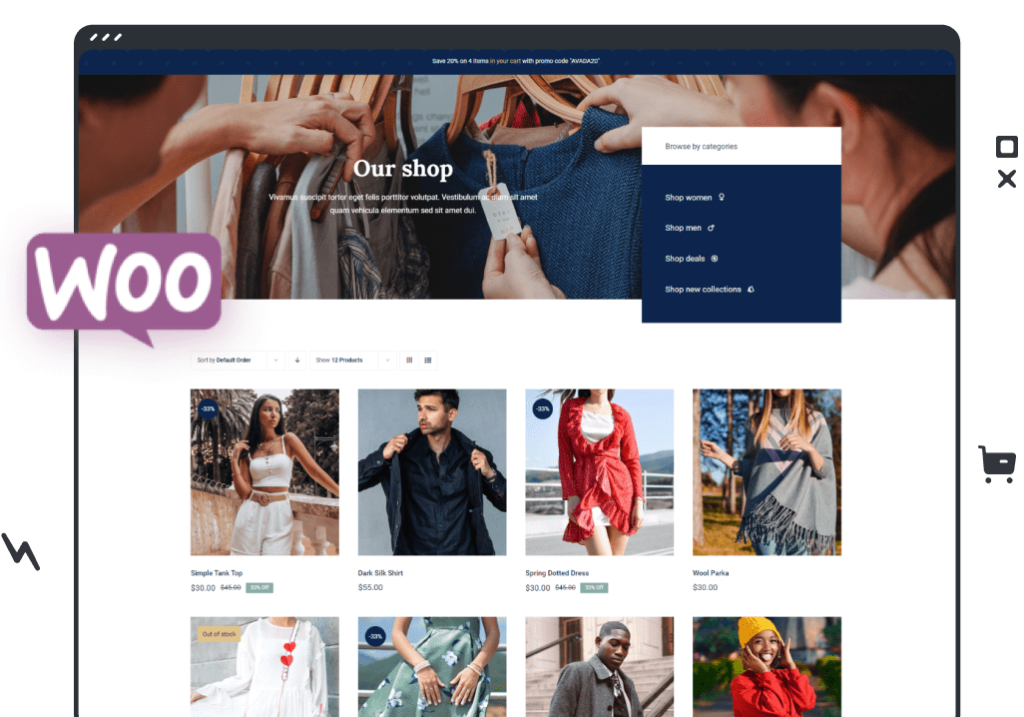
WooCommerce stands out for its flexibility and design freedom. As an open-source platform, it offers limitless customization options. This means you can tailor every aspect of your online store to match your brand’s unique identity. Unlike Shopify, WooCommerce allows you to modify the source code, giving you full control over your site’s functionality and appearance.
With WooCommerce, you can choose from thousands of free and premium WordPress themes, each offering a different style and layout. This level of customization is particularly appealing to businesses with specific design requirements or those wanting to stand out in a crowded market. For a detailed comparison of platforms, check out this WooCommerce vs Shopify guide.
Importance of Mobile Optimization
- Mobile shopping is on the rise, with more consumers using smartphones to make purchases.
- Both Shopify and WooCommerce offer mobile-responsive themes to ensure your store looks great on any device.
- Optimizing for mobile enhances user experience and can lead to higher conversion rates.
In today’s fast-paced world, consumers expect a seamless shopping experience, regardless of the device they use. Therefore, it’s crucial to ensure your online store is mobile-optimized. Both Shopify and WooCommerce provide themes that are designed to look great on smartphones and tablets.
Mobile optimization not only improves user experience but also positively impacts your search engine rankings. Google considers mobile-friendliness as a ranking factor, so a mobile-optimized store can help you reach more customers.
Ultimately, choosing a platform that supports mobile optimization is essential for success in the ecommerce world.
Sales Features and Tools
When it comes to sales features and tools, both Shopify and WooCommerce offer robust solutions to help you manage your online store effectively. From inventory management to marketing tools, these platforms provide everything you need to drive sales and grow your business. For additional insights, you might explore Jetpack user engagement tools to enhance your store’s capabilities.
Let’s explore the sales features offered by each platform, including how WooCommerce can enhance your e-commerce strategy.
In-Built Shopify Sales Tools
Shopify comes with a wide array of built-in sales tools designed to streamline your ecommerce operations. These include inventory management, abandoned cart recovery, and integrated payment processing. Shopify’s point-of-sale (POS) system allows you to sell both online and in-person, providing a seamless shopping experience for your customers.
WooCommerce Plugins and Extensions
WooCommerce offers an extensive range of plugins and extensions that can enhance your store’s functionality. Whether you need advanced inventory management, email marketing integration, or subscription services, WooCommerce’s vast library of plugins has you covered. This flexibility allows you to build a store that meets your specific business needs.
Third-party Integration Capabilities
Both Shopify and WooCommerce support integration with third-party apps and services, enabling you to extend your store’s capabilities. Shopify’s App Store features thousands of apps that can help you manage everything from marketing to customer support. WooCommerce, being a WordPress plugin, can integrate with a wide range of WordPress plugins and third-party services.
Choosing the right integrations can enhance your store’s functionality and improve your overall business operations. For a powerful e-commerce strategy, consider exploring the WooCommerce Astra e-commerce strategy.
Most importantly, ensure that the integrations you choose align with your business goals and help you deliver a better customer experience. For instance, using Jetpack user engagement tools can enhance how you interact with your customers online.
SEO Capabilities and Performance
SEO (Search Engine Optimization) is crucial for driving organic traffic to your online store. Both Shopify and WooCommerce offer tools and features to help you optimize your store for search engines. Let’s delve into the SEO capabilities of each platform.
Shopify and WooCommerce both support SEO best practices, but they offer different approaches to achieving high search engine rankings.
Shopify’s SEO Tools
Shopify provides a range of SEO tools to help you optimize your store’s content and structure. These include customizable title tags, meta descriptions, and alt text for images. Shopify also generates a sitemap for your store, making it easier for search engines to index your pages.
“Shopify’s built-in SEO features make it easy for beginners to optimize their stores without needing technical expertise.”
Shopify’s platform is designed with SEO in mind, ensuring that your store meets search engine requirements from the start.
However, it’s essential to continually optimize your store’s content and structure to maintain high search engine rankings.
SEO Potential in WooCommerce
WooCommerce, integrated with WordPress, offers powerful SEO capabilities. WordPress is renowned for its SEO-friendly structure, and with the help of plugins like Yoast SEO, you can optimize every aspect of your WooCommerce store. This includes customizing URLs, managing redirects, and creating XML sitemaps.
WooCommerce’s flexibility allows you to implement advanced SEO strategies, making it a preferred choice for businesses focused on content marketing and SEO.
By leveraging WooCommerce’s SEO potential, you can improve your store’s visibility and attract more organic traffic.
Comparative Analysis on SEO Efficiency
While both platforms offer strong SEO capabilities, WooCommerce’s integration with WordPress gives it an edge in terms of flexibility and control. Shopify’s built-in SEO features are more user-friendly, making it a suitable choice for beginners.
Ultimately, the best platform for SEO depends on your business goals and technical expertise. If you’re comfortable with WordPress and want full control over your SEO strategy, WooCommerce is the way to go. However, if you prefer a more straightforward approach, Shopify’s built-in tools provide a solid foundation for SEO success.
Security Features and Trustworthiness
Ensuring the security of your online store is paramount to protecting customer data and maintaining trust. Both Shopify and WooCommerce offer security features to safeguard your store, but they approach security differently.
Security in Shopify
Shopify is a fully hosted platform, meaning security is managed by Shopify itself. This includes SSL certification, PCI compliance, and regular security updates. As a result, Shopify users can rest assured that their store is protected from potential threats.
Shopify’s robust security features make it a reliable choice for businesses concerned about protecting customer data.
WooCommerce Security Measures
WooCommerce, being a self-hosted solution, requires users to take a more hands-on approach to security. This includes selecting a secure hosting provider, implementing SSL certificates, and regularly updating WordPress and plugins. Fortunately, there are numerous security plugins available for WooCommerce that can help protect your store from vulnerabilities.
Importance of Keeping Customer Data Safe
Maintaining the security of customer data is crucial for building trust and ensuring repeat business. Customers need to feel confident that their personal and financial information is safe when shopping on your site. Therefore, it’s essential to choose a platform that offers robust security features and take proactive measures to safeguard your store.
Customer Support and Community Engagement
Access to reliable customer support is vital for resolving issues quickly and efficiently. Both Shopify and WooCommerce offer support options, but they differ in terms of availability and resources.
Shopify provides 24/7 customer support via phone, email, and live chat, ensuring that help is always available when you need it.
“WooCommerce’s community-driven support system offers a wealth of resources, but users may need to rely on forums and documentation for assistance.”
WooCommerce users can access support through the WordPress community, forums, and extensive documentation. However, premium support options are available for those who require additional assistance.
Accessing Shopify Support
Shopify’s dedicated support team is available around the clock to assist with any issues you may encounter. Whether you need help setting up your store or troubleshooting a technical problem, Shopify’s support team is there to help.
Most importantly, Shopify’s comprehensive support ensures that you can focus on growing your business without worrying about technical difficulties.
By choosing a platform with reliable customer support, you can ensure a smooth and successful ecommerce journey.
Support System in WooCommerce
WooCommerce’s support system is heavily community-driven, which can be both an advantage and a challenge. While there isn’t a centralized support team like Shopify’s, WooCommerce users benefit from a vast array of resources created by the community. This includes forums, tutorials, and extensive documentation that can guide you through almost any issue you might face.
The open-source nature of WooCommerce means that developers around the world contribute to its growth, creating plugins and extensions that enhance its functionality. This community support can be invaluable, especially for those who are technically inclined and enjoy troubleshooting on their own.
However, if you prefer direct support, WooCommerce does offer premium support packages. These packages can provide more personalized assistance, ensuring you have the help you need when you encounter more complex issues.
“The community is your best friend with WooCommerce. Engage with forums, learn from others, and share your experiences.”
By leveraging the community resources available, you can maximize the potential of WooCommerce and create a store that meets your unique needs.
Community Resources and Forums
WooCommerce’s community resources are a treasure trove of information. Whether you’re looking for help with a specific issue or seeking inspiration for your store, the community has you covered.
- WordPress.org forums
- WooCommerce documentation
- Developer blogs and tutorials
- Social media groups and communities
Engaging with these resources can provide you with valuable insights and tips to enhance your WooCommerce experience.
By actively participating in the community, you can learn from others’ experiences and contribute your own knowledge to help fellow users.
Best Choice for Different Business Needs
Choosing between Shopify and WooCommerce ultimately depends on your specific business needs. Both platforms have their strengths, and understanding which aligns with your goals is key to making the right decision.
Let’s explore which platform might be best suited for different types of businesses.
Large Enterprises and High-Volume Sellers
For large enterprises and high-volume sellers, Shopify’s scalability and robust infrastructure make it an excellent choice. With its dedicated support and enterprise-level features, Shopify can handle the demands of a growing business without compromising performance.
Small Businesses and Niche Stores
WooCommerce is often the preferred choice for small businesses and niche stores due to its flexibility and cost-effectiveness. With WooCommerce, you can tailor your store to meet specific needs without incurring high monthly fees. This makes it ideal for startups and businesses with unique product offerings.
Additionally, WooCommerce’s integration with WordPress allows you to leverage content marketing strategies to reach your target audience effectively.
Tech-Savvy vs Novice Users
Tech-savvy users who enjoy customization and have a good grasp of WordPress will find WooCommerce to be a rewarding platform. Its open-source nature provides endless possibilities for those willing to dive into the technical aspects of ecommerce.
Conversely, novice users who prioritize ease of use and want a straightforward setup process will appreciate Shopify’s user-friendly interface and comprehensive support. Shopify’s all-in-one solution allows beginners to focus on growing their business without getting bogged down in technical details.
Final Thoughts on Choosing Your Platform
Choosing the right ecommerce platform is a critical decision that can significantly impact your business’s success. Both Shopify and WooCommerce offer compelling features, but the best choice depends on your specific needs, budget, and technical expertise.
Summary of Key Findings
Shopify is ideal for businesses seeking simplicity and a wide range of built-in sales tools. Its straightforward pricing and dedicated support make it a reliable choice for those who prefer an all-in-one solution.
WooCommerce offers unparalleled flexibility and customization options, making it a favorite among tech-savvy users and small businesses. Its integration with WordPress provides powerful SEO capabilities, enhancing your store’s visibility.
Ultimately, the decision comes down to your business goals, technical skills, and the level of control you desire over your online store.
Personal Recommendations
For those just starting out or who prefer a hands-off approach, Shopify’s user-friendly platform and comprehensive support are hard to beat. It allows you to focus on what matters most—growing your business.
If you value flexibility and customization and are comfortable with a more hands-on approach, WooCommerce provides the tools you need to create a unique and powerful online store. Its open-source nature allows you to tailor every aspect of your store to suit your brand. For more insights on enhancing your eCommerce strategy, check out this WooCommerce and Astra eCommerce strategy guide.
Frequently Asked Questions
To help you make an informed decision, let’s address some common questions about Shopify and WooCommerce.
Can I switch from WooCommerce to Shopify or vice versa easily?
Switching between platforms is possible, but it requires careful planning and execution. Both Shopify and WooCommerce offer migration tools and guides to help you transfer your data. However, it’s important to back up your data and test the new setup before making the switch.
Consider consulting with a professional if you’re unsure about the migration process to ensure a smooth transition.
Which platform is better for growing my online store?
Both Shopify and WooCommerce offer growth potential, but the best platform depends on your business goals and resources. Shopify’s scalability and support make it a strong choice for businesses aiming for rapid growth. WooCommerce’s flexibility allows for tailored growth strategies, particularly for businesses focusing on content marketing and SEO.
How does payment processing differ between these platforms?
Shopify has its own payment gateway, Shopify Payments, which simplifies payment processing but charges transaction fees if you use external gateways. WooCommerce supports various payment gateways, including PayPal and Stripe, offering more flexibility but requiring setup and configuration.
Choose the platform that aligns with your preferred payment methods and transaction fees.
What are the scalability options for each platform?
Shopify is designed to scale with your business, offering features like unlimited bandwidth and products, as well as dedicated support for high-volume sellers. WooCommerce’s scalability depends on your hosting provider and setup, allowing for more control but requiring technical management.
“Scalability is key to long-term success. Choose a platform that can grow with your business and support your future needs.”
Consider your growth plans and technical capabilities when choosing a platform to ensure it can accommodate your evolving business needs. For insights on future trends, check out these WordPress trends and innovations.
Both platforms offer scalability, but the approach and requirements differ, so choose the one that best fits your growth strategy.
Are there any additional costs I should be aware of with each platform?
With Shopify, additional costs can include transaction fees, app subscriptions, and premium themes. These can add up, so it’s important to factor them into your budget.
WooCommerce, while free to use, may incur costs for hosting, premium plugins, and themes. Additionally, you might need to invest in security measures and technical support.
Understanding these potential costs can help you make a more informed decision about which platform aligns with your budget and business goals. For a detailed comparison, consider exploring the WooCommerce vs Shopify guide to see which platform might be the best fit for your needs.
Ultimately, both Shopify and WooCommerce offer unique advantages and challenges. By carefully considering your business needs, budget, and technical skills, you can choose the platform that best supports your ecommerce journey.


Leave a Reply