
Key Takeaways
- Installing Akismet on WordPress is straightforward and often pre-installed; just activate it.
- Akismet’s automatic comment filtering significantly reduces spam by using advanced AI.
- Configuring your API key is crucial for Akismet to function properly and connect to its server.
- Regularly monitor and adjust your spam settings to optimize Akismet’s performance.
- Customizing comment moderation settings allows you to maintain control over what appears on your site.
Getting Started with Akismet Spam Protection

“Reliable Spam Checking …” from www.duocircle.com
When you run a blog or website, spam can quickly become a major nuisance. That’s where Akismet comes in, a tool designed to keep your site clean and professional by filtering out unwanted spam comments. Let’s dive into how you can get started with Akismet and why it’s essential for your online presence.
Understanding Akismet
Akismet is a powerful anti-spam plugin primarily used with WordPress, but its capabilities extend beyond just one platform. By leveraging advanced artificial intelligence, Akismet automatically filters out spam comments, ensuring only legitimate interactions appear on your site. This not only saves time but also enhances your site’s credibility and user experience.
Why Protecting Against Spam is Crucial
Spam comments are more than just an annoyance; they can harm your website’s reputation and security. Spam often contains malicious links that could lead your visitors to harmful sites or even compromise their data. Additionally, spam can clutter your comment sections, making it difficult for genuine interactions to shine through.
Most importantly, a website filled with spam looks unprofessional and can deter potential visitors or customers. Therefore, protecting against spam isn’t just about convenience; it’s about maintaining the integrity and trustworthiness of your online presence. For comprehensive protection strategies, consider exploring Wordfence security measures.
Basic Setup and Installation Steps
Setting up Akismet is a breeze, especially if you’re using WordPress. In fact, Akismet often comes pre-installed with WordPress, so you might just need to activate it. Here’s how you can get started:
- Navigate to the ‘Plugins’ section in your WordPress dashboard.
- Find Akismet in the list of installed plugins.
- Click ‘Activate’ to enable Akismet on your site.
- Follow the on-screen instructions to set up your Akismet account and obtain an API key.
- Enter your API key in the Akismet settings to start filtering spam.
Once activated, Akismet begins working immediately, filtering out spam and keeping your comment sections clean.
Key Features of Akismet
Understanding the key features of Akismet will help you utilize it to its full potential. Let’s explore some of the standout capabilities that make Akismet a top choice for spam protection.
Automatic Comment Filtering Explained
One of Akismet’s most compelling features is its ability to automatically filter comments. It uses a combination of algorithms and a vast database of spammy patterns to identify and block spam before it even reaches your moderation queue. This means you spend less time sifting through unwanted comments and more time engaging with your audience. For additional security measures, consider exploring Wordfence Security tools to safeguard your site.
API Key Configuration and Importance
To unlock Akismet’s full potential, configuring your API key is essential. This key acts as a bridge between your site and Akismet’s servers, allowing the plugin to access the latest spam detection algorithms and data. Here’s why it’s crucial:
- Enables real-time spam filtering by connecting to Akismet’s extensive database.
- Ensures your site is protected against the latest spam techniques.
- Allows you to manage and track your spam statistics through the Akismet dashboard.
Without a properly configured API key, Akismet can’t function, making it a vital step in your setup process.
Monitoring and Adjusting Spam Settings
While Akismet does a fantastic job out of the box, monitoring and adjusting your spam settings can further enhance its effectiveness. Regularly check your spam queue to ensure legitimate comments aren’t mistakenly marked as spam. If you notice patterns or specific types of comments slipping through, consider adjusting your settings or adding custom rules to better filter them out.
Besides that, staying proactive with your spam settings helps maintain a clean and engaging comment section, fostering better interactions with your audience.
Utilizing Akismet’s Strictness Levels
Akismet offers various strictness levels to tailor spam protection to your specific needs. These settings determine how aggressive Akismet is in identifying and filtering out spam. For instance, if you notice a high volume of spam comments slipping through, increasing the strictness level can help mitigate this issue. However, be cautious, as higher strictness levels may also increase the likelihood of false positives, where legitimate comments are incorrectly flagged as spam.
To adjust the strictness level, navigate to the Akismet settings in your WordPress dashboard. Here, you can experiment with different settings to find the right balance between filtering out spam and allowing genuine comments. Regularly reviewing and tweaking these settings ensures that Akismet operates effectively according to your site’s unique needs. For additional security measures, consider exploring Wordfence security tools to further safeguard your site.
Regularly Reviewing Spam Filters
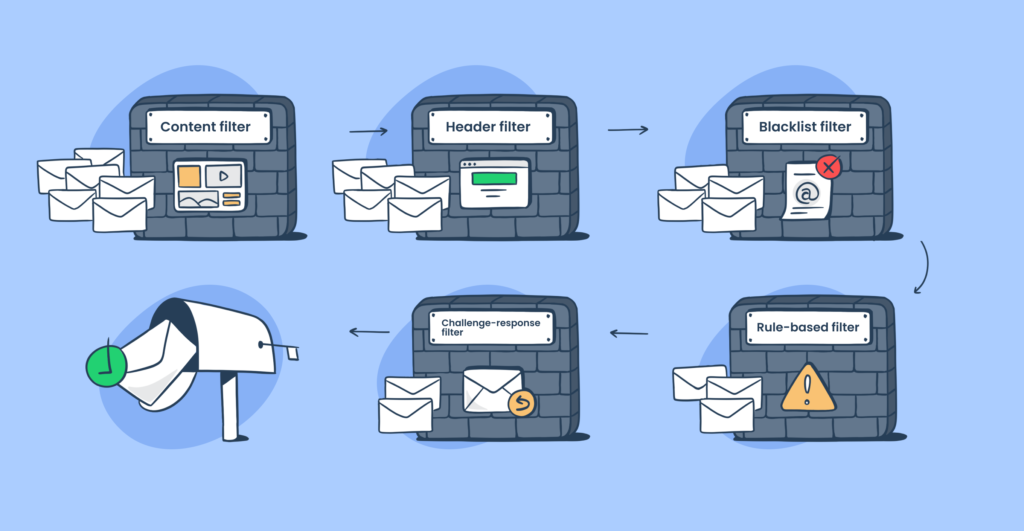
“Spam Filters Explained [2025]” from mailtrap.io
While Akismet is highly effective, it’s crucial to regularly review your spam filters to ensure they’re working optimally. This involves checking the spam queue for legitimate comments that may have been mistakenly flagged and adjusting your filters accordingly. Regular reviews help you understand the types of spam your site is receiving and allow you to make informed decisions about your spam protection strategy.
Set a routine to check your spam filters, perhaps weekly or bi-weekly, depending on your site’s traffic. This proactive approach not only keeps your comment section clean but also enhances user engagement by ensuring genuine interactions are not lost in the spam pile.
Integrating with Non-WordPress Platforms
Although Akismet is best known as a WordPress plugin, it can be integrated with other platforms to provide robust spam protection. This versatility makes Akismet a valuable tool for various website frameworks. To integrate Akismet with a non-WordPress platform, you’ll need to connect your site to the Akismet API.
The process typically involves acquiring an API key and using it to configure Akismet on your chosen platform. Many third-party plugins and libraries are available to facilitate this integration, making it straightforward to extend Akismet’s powerful spam protection capabilities to any site. By doing so, you ensure that your website remains spam-free, regardless of the platform you use.
Advanced Tips for Experienced Users
For those who are more familiar with Akismet and its capabilities, there are advanced strategies to further optimize spam protection. These tips can help you make the most of Akismet’s features and ensure your site remains secure and engaging.
Understanding Advanced Akismet Settings
Diving into Akismet’s advanced settings allows you to fine-tune its performance. These settings provide greater control over how spam is detected and managed on your site. For instance, you can configure Akismet to automatically discard the worst spam, reducing the load on your moderation queue and saving valuable time.
Explore the advanced settings in your Akismet dashboard to discover additional options that can enhance your site’s spam protection. Understanding and utilizing these settings will empower you to maintain a clean and professional website environment.
Leveraging the Akismet Dashboard
The Akismet dashboard is a powerful tool that provides insights into your site’s spam activity. By regularly accessing the dashboard, you can monitor spam statistics, track the number of comments blocked, and identify patterns in spam attacks. This information is invaluable for making data-driven decisions about your spam protection strategy.
Use the dashboard to stay informed about how Akismet is performing and to make any necessary adjustments to your settings. Keeping a close eye on your spam statistics ensures that your site remains protected against evolving spam tactics.
Using Akismet with Other Security Plugins
For comprehensive website security, consider using Akismet alongside other security plugins. While Akismet excels at filtering spam comments, additional plugins can provide broader protection against other threats such as malware and hacking attempts. Combining Akismet with a robust security suite ensures that your website is well-protected on all fronts.
Research and select security plugins that complement Akismet’s capabilities and align with your site’s specific needs. This layered approach to security provides peace of mind and helps safeguard your online presence. For additional security measures, consider exploring Wordfence security tools to further enhance your site’s protection.
Common Pitfalls and How to Avoid Them

“Akismet Spam Filtering Service: Pricing …” from www.cledara.com
Even with a powerful tool like Akismet, there are common pitfalls that users may encounter. Being aware of these challenges and knowing how to address them can help you maintain effective spam protection.
Avoiding False Positives in Spam Filtering
One of the challenges with any spam filter is the potential for false positives, where legitimate comments are mistakenly flagged as spam. This can hinder user engagement and frustrate your audience. To avoid this, regularly review your spam queue and whitelist frequent commenters who may be incorrectly flagged.
Additionally, consider adjusting Akismet’s strictness levels if you notice an increase in false positives. By actively managing your spam filters, you can minimize the impact of false positives and ensure a positive experience for your users.
Ensuring Akismet Stays Updated
Keeping Akismet updated is essential for maintaining effective spam protection. Updates often include improvements to spam detection algorithms and new features that enhance performance. Ensure your Akismet plugin is set to update automatically, or regularly check for updates in your WordPress dashboard.
By staying current with updates, you ensure that Akismet continues to provide optimal spam protection, adapting to new spam techniques as they emerge. Regular updates are a crucial part of maintaining a secure and spam-free website environment.
In conclusion, Akismet is a powerful ally in the fight against spam. By understanding its features and implementing these strategies, you can protect your site from unwanted spam and create a more engaging and professional online presence. For additional security measures, consider exploring Wordfence security tools to further safeguard your site.
Dealing with API Key Issues
Occasionally, users may encounter issues with their Akismet API key. This can result from an incorrect key entry, expired key, or server connectivity issues. To resolve these problems, first ensure that your API key is entered correctly in the Akismet settings. Double-check for any typographical errors or missing characters.
If the issue persists, visit the Akismet website to verify the status of your API key. You may need to renew or upgrade your subscription if your key has expired. Additionally, ensure that your server can connect to Akismet’s servers, as firewall or network settings may block the connection.
Final Thoughts on Using Akismet
Akismet remains a top choice for bloggers and website owners seeking robust spam protection. Its ease of use, advanced filtering capabilities, and versatility across platforms make it an invaluable tool for maintaining a clean and professional online presence.
- Ensure your API key is correctly configured to unlock Akismet’s full potential.
- Regularly monitor your spam settings to optimize filtering performance.
- Consider integrating Akismet with other security plugins for comprehensive protection.
- Stay informed about updates to keep your site secure against evolving spam threats.
- Engage with your audience by minimizing false positives and allowing genuine interactions.
By implementing these strategies, you can maximize Akismet’s effectiveness and create a safer, more engaging environment for your visitors.
Spam protection is not just a technical necessity; it’s an essential part of building trust and credibility with your audience. A spam-free site is more inviting, encouraging users to interact and engage with your content. Therefore, investing time in optimizing your spam protection strategy is a worthwhile endeavor.
Remember, Akismet is just one piece of the puzzle. Combine it with a comprehensive security plan to safeguard your site from a wide range of threats, ensuring a seamless and enjoyable experience for your users.
The Role of Spam Protection in Website Security
Spam protection plays a crucial role in overall website security. It helps prevent malicious links and content from infiltrating your site, reducing the risk of data breaches and other cyber threats. By keeping spam at bay, you protect your visitors and maintain the integrity of your online presence.
“Spam is not just an inconvenience; it’s a security risk. Effective spam protection is essential for maintaining a safe and secure website environment.”
Implementing strong spam protection measures like Akismet ensures that your site remains a safe space for users, fostering trust and encouraging engagement.
In the ever-evolving landscape of online threats, staying vigilant and proactive in your spam protection efforts is key. Regularly review and adjust your settings to stay ahead of new spam tactics and keep your site secure. For more comprehensive security measures, consider exploring Wordfence security tools to further safeguard your site.
Future Developments in Spam Protection
As technology advances, so do the methods used by spammers. Future developments in spam protection will likely involve more sophisticated AI and machine learning algorithms to detect and block spam more effectively. Akismet and other spam protection tools will continue to evolve, providing even more robust and efficient solutions for website owners.
Frequently Asked Questions
Here are some common questions users have about Akismet and its spam protection capabilities.
How do I install Akismet on my WordPress site?
To install Akismet on your WordPress site, navigate to the ‘Plugins’ section in your dashboard. If Akismet is pre-installed, simply activate it. If not, search for Akismet in the plugin repository, install it, and follow the setup instructions to configure your API key.
Can Akismet be used with platforms other than WordPress?
Yes, Akismet can be integrated with various platforms using its API. This allows you to extend its spam protection capabilities beyond WordPress, providing a versatile solution for different website frameworks.
To integrate Akismet with another platform, obtain an API key and use available third-party plugins or libraries to configure the connection. For additional security measures, consider exploring Wordfence security tools to safeguard your site.
What should I do if Akismet marks legitimate comments as spam?
If Akismet mistakenly marks legitimate comments as spam, review your spam queue regularly to identify and approve them. You can also adjust the strictness level in the Akismet settings to reduce false positives and whitelist frequent commenters who may be incorrectly flagged. For additional security measures, consider exploring Wordfence security tools to safeguard your site.
How does Akismet affect the performance of my website?
Akismet is designed to operate efficiently in the background without significantly impacting your website’s performance. By filtering spam comments before they reach your moderation queue, it actually reduces the workload on your site, ensuring smoother operation and better user experience. For more on maintaining your site’s performance, check out these WordPress SEO best practices.
Is there a way to see all the spam comments Akismet has blocked?
Yes, you can view all the spam comments Akismet has blocked by accessing the spam queue in your WordPress dashboard. This allows you to review and manage the filtered comments, ensuring that legitimate interactions are not lost. For additional WordPress security tips, check out this Jetpack WordPress security guide.
- Regularly check the spam queue to monitor Akismet’s performance.
- Use the Akismet dashboard to track spam statistics and identify patterns.
- Adjust your spam settings based on the types of spam your site receives.
By staying proactive in managing your spam filters, you ensure that Akismet continues to provide effective protection while maintaining a positive user experience.


Leave a Reply