
Key Takeaways
- Wordfence Security is essential for protecting WordPress sites from cyber threats, offering a robust suite of tools including a Web Application Firewall and malware scanner.
- To maximize security, regularly update your Wordfence plugin and configure its settings to match your specific security needs.
- Implementing Wordfence tools effectively requires understanding each feature, such as the two-factor authentication and real-time threat defense feed.
- Wordfence Premium offers additional features like real-time IP blocklists and country blocking, which can be crucial for high-risk sites.
- Regular site scans and security alerts can help in identifying and mitigating potential vulnerabilities before they are exploited.
Importance of Wordfence Security for Website Safety
“Use WordFence Security Plugin Tutorial …” from www.youtube.com
In today’s digital age, ensuring the safety of your website is more crucial than ever. Cyber threats are on the rise, and WordPress sites are frequent targets due to their popularity. This is where Wordfence Security steps in, providing a comprehensive solution to safeguard your site.
Why Wordfence is Essential for WordPress Sites
Wordfence is more than just a plugin; it’s a fortress for your WordPress site. It offers a range of features designed to protect against common vulnerabilities and attacks. With millions of active installations, it’s a trusted solution for website owners who want peace of mind.
One of the standout features of Wordfence is its ability to block malicious traffic before it reaches your site. It acts as a gatekeeper, ensuring that only legitimate users can access your content. This is particularly important for sites that handle sensitive information or financial transactions.
Practices to Maximize Site Security with Wordfence
Maximizing your site’s security with Wordfence requires more than just installation. Here are some best practices to ensure you’re getting the most out of this powerful tool, including resolving WordPress plugin conflicts that may arise.
- Regular Updates: Always keep your Wordfence plugin updated to the latest version. This ensures you have the latest security patches and features.
- Custom Configuration: Tailor the settings to suit your specific needs. For instance, adjust the firewall settings based on your site’s traffic and risk level.
- Two-Factor Authentication: Enable this feature to add an extra layer of security to your login process.
- Real-Time Monitoring: Utilize the real-time threat defense feed to stay informed about potential threats and take action promptly.
By following these practices, you can significantly reduce the risk of a security breach and ensure that your site remains safe and secure.
Understanding the Impact of Strong Security on Performance
While security is paramount, it’s also important to consider how security measures impact your site’s performance. Wordfence is designed to provide robust protection without compromising speed. However, it’s essential to monitor your site’s performance regularly to ensure that security features aren’t causing unnecessary slowdowns. If you encounter issues, explore solutions for WordPress plugin conflicts to maintain optimal performance.
Optimizing Wordfence settings can help maintain a balance between security and performance. For example, configuring the firewall to block only high-risk traffic can reduce the load on your server while still providing strong protection.
Overview of Wordfence Security Features
“iThemes Security vs Wordfence: Which …” from www.malcare.com
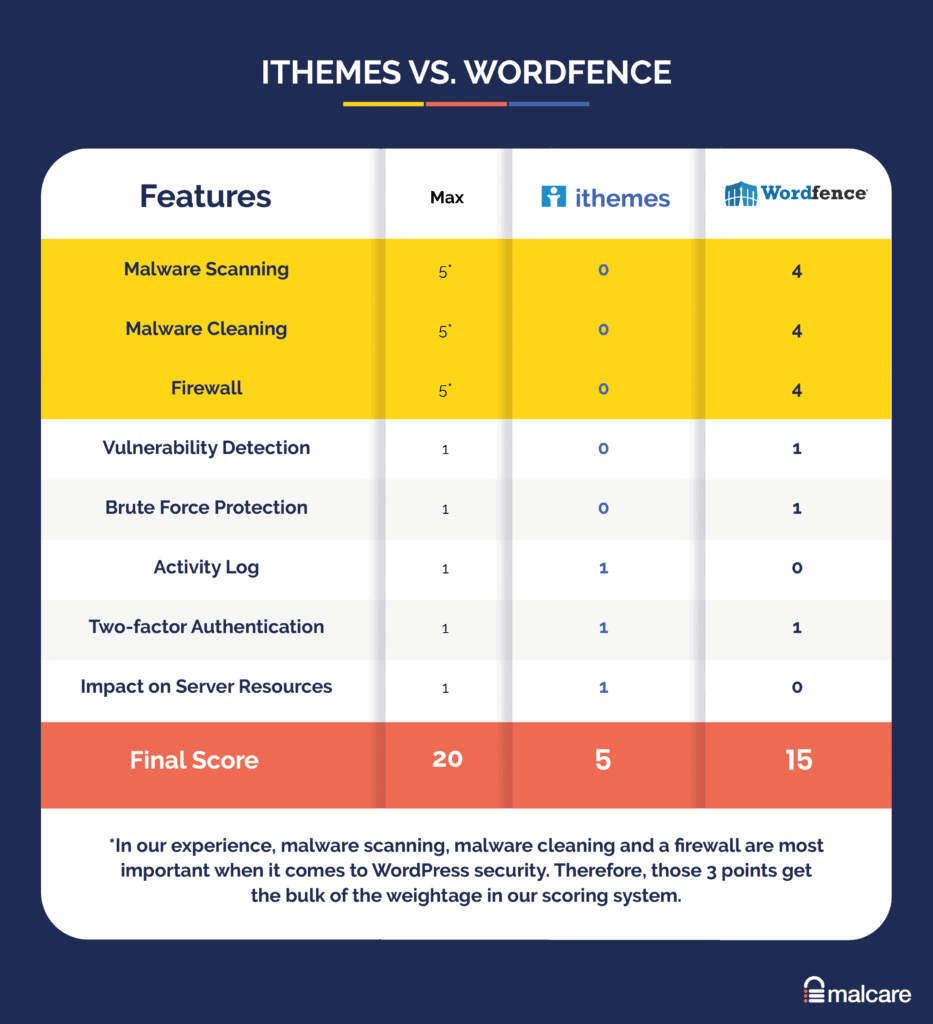
Wordfence offers a comprehensive suite of features designed to protect your site from a wide range of threats. Understanding these features is key to implementing them effectively.
Web Application Firewall (WAF)
The Web Application Firewall is a critical component of Wordfence. It acts as a barrier between your site and potential threats, blocking malicious traffic before it can cause harm. The WAF is regularly updated with the latest threat intelligence, ensuring that your site is protected against emerging threats.
Malware Scanner Essentials
Wordfence’s malware scanner is another powerful tool in your security arsenal. It scans your site for known malware signatures, backdoors, and other vulnerabilities. Regular scans are essential to detect and remove threats before they can cause damage. Learn more about how to protect your WordPress site using Wordfence.
- Automatic Scans: Schedule regular scans to ensure continuous protection.
- Manual Scans: Perform manual scans if you suspect a security breach.
- Scan Results: Review scan results to identify and address vulnerabilities promptly.
By utilizing the malware scanner, you can maintain a clean and secure website environment.
Implementing Wordfence Tools Effectively
Implementing Wordfence tools effectively is crucial for maximizing your site’s security. The key lies in understanding each feature and configuring it to meet your specific needs. From installation to advanced settings, every step plays a vital role in safeguarding your website.
Plugin Installation and Setup
Installing Wordfence is the first step towards a secure WordPress site. Begin by navigating to your WordPress dashboard, selecting ‘Plugins,’ and clicking ‘Add New.’ Search for ‘Wordfence Security,’ then click ‘Install Now’ followed by ‘Activate.’
Once activated, Wordfence will prompt you to configure basic settings. It’s important to carefully review these settings, ensuring that the firewall is enabled and that you have opted into the real-time threat defense feed. This initial setup forms the foundation of your site’s security strategy. For those managing e-commerce platforms, consider exploring successful WooCommerce e-commerce websites for additional insights on integrating security measures.
Customizing Security Alerts
Customizing security alerts ensures you receive timely notifications about potential threats. Navigate to the Wordfence dashboard and select ‘Email Alert Preferences.’ Here, you can choose which alerts to receive, such as notifications for login attempts, file changes, or blocked IP addresses.
By tailoring these alerts to your needs, you can stay informed without being overwhelmed by unnecessary notifications. This proactive approach allows you to address security issues promptly, minimizing potential damage.
Conducting Regular Site Scans
Regular site scans are essential for detecting vulnerabilities and malware. Wordfence’s scanner can be scheduled to run automatically at intervals that suit your site’s activity level. For high-traffic sites, daily scans are recommended, while weekly scans may suffice for smaller sites.
After each scan, review the results carefully. Address any flagged issues immediately, whether they involve malware removal or updating outdated plugins. This consistent vigilance helps maintain a secure and healthy site environment.
Utilizing Two-Factor Authentication
Two-factor authentication (2FA) adds an extra layer of security to your login process. To enable 2FA, navigate to ‘Login Security’ in the Wordfence menu. Follow the prompts to set up 2FA for your admin account and any other user accounts with access to sensitive areas of your site.
By requiring a second form of verification, such as a code sent to your mobile device, 2FA significantly reduces the risk of unauthorized access. This simple yet effective measure is a must-have for any site handling sensitive data. For those building a business website, consider exploring the best OceanWP theme for business websites to enhance security features alongside 2FA.
Advanced Security Management with Wordfence Central

“Strategic Planning in Security Management” from www.linkedin.com
For those managing multiple WordPress sites, Wordfence Central offers a powerful solution for centralized security management. This tool allows you to monitor and configure security settings across all your sites from a single dashboard.
Managing Multiple Sites with Ease
- Centralized Dashboard: View security alerts and scan results for all your sites in one place.
- Unified Configuration: Apply security settings consistently across multiple sites.
- Streamlined Monitoring: Receive notifications and updates for all your sites through a single interface.
Using Wordfence Central, you can efficiently manage security for multiple sites, saving time and reducing the risk of oversight.
Besides that, Wordfence Central simplifies the process of applying updates and changes across your network of sites. This ensures that all your sites benefit from the latest security enhancements and configurations.
Centralized Security Monitoring
Centralized security monitoring is a game-changer for website administrators. With Wordfence Central, you can track security events and alerts from a unified interface. This means no more switching between dashboards to keep an eye on each site individually.
Most importantly, centralized monitoring enables quicker response times to potential threats. By having all the information you need at your fingertips, you can take immediate action to address vulnerabilities and protect your sites.
Optimizing Settings for Enhanced Protection
Optimizing your Wordfence settings is crucial for achieving the highest level of protection. Start by reviewing the default settings and making adjustments based on your site’s specific needs. Consider factors such as traffic volume, user access levels, and the types of data your site handles.
For example, enabling country blocking can prevent access from regions known for high levels of cybercrime. Additionally, configuring the rate-limiting settings can help mitigate brute force attacks by restricting the number of login attempts allowed within a specified timeframe.
Wordfence Premium: Is It Worth It?
Wordfence Premium offers additional features that can enhance your site’s security beyond the capabilities of the free version. But is it worth the investment? Let’s explore what Premium has to offer.
For many site owners, the decision to upgrade to Premium depends on their specific security needs and risk factors. If your site handles sensitive data or experiences high traffic, the enhanced features of Wordfence Premium can provide an added layer of protection that justifies the cost.
Features Exclusive to Premium Users
Wordfence Premium includes several exclusive features designed to enhance security:
- Real-Time IP Blocklist: Automatically blocks known malicious IP addresses in real-time, reducing the risk of attacks.
- Country Blocking: Restrict access to your site based on geographic location, useful for sites targeted by specific regions.
- Advanced Manual Blocking: Provides more control over blocking specific users or IP addresses.
These features can be particularly beneficial for sites that require stringent security measures or have experienced targeted attacks in the past. For more insights on managing website security and compatibility, check out our guide on WordPress plugin conflicts solutions.
Ultimately, the decision to upgrade to Wordfence Premium should be based on a thorough assessment of your site’s security needs and the potential benefits of the additional features.
Cost-Benefit Analysis of Premium Services
When considering whether to upgrade to Wordfence Premium, it’s important to weigh the costs against the benefits. The premium version offers advanced features that provide enhanced security, but these come at a price. The annual cost for Wordfence Premium is approximately $99 per site, but discounts are available for bulk purchases.
For many users, the peace of mind that comes with features like real-time IP blocklists and country blocking is worth the investment. These tools can prevent attacks before they even reach your site, saving you from potential downtime and data breaches that could cost far more than the subscription fee.
Moreover, the advanced manual blocking feature gives site owners greater control over who can access their site, allowing for proactive threat management. This can be especially beneficial for e-commerce sites or those handling sensitive user data, where security is paramount.
User Testimonials and Case Studies
Many users have shared positive experiences with Wordfence Premium, highlighting its effectiveness in enhancing site security. For instance, a case study involving a popular online store revealed that after upgrading to Wordfence Premium, the site saw a 50% reduction in attempted attacks, resulting in smoother operations and increased customer trust.
Another user reported that the country blocking feature effectively stopped a wave of malicious traffic originating from regions known for cybercrime. This proactive measure not only protected the site but also improved its overall performance by reducing server load.
Final Thoughts on Using Wordfence for Site Security
Wordfence Security is a powerful tool for safeguarding WordPress sites against a wide range of threats. Its comprehensive suite of features, from the web application firewall to the malware scanner, provides robust protection that is essential in today’s digital landscape.
While the free version offers substantial security, Wordfence Premium’s advanced features are worth considering for sites that require extra protection. The ability to block malicious IPs in real-time and restrict access by country can make a significant difference in maintaining site integrity and performance.
Summarizing Wordfence’s Benefits
In summary, Wordfence offers several key benefits that make it a top choice for WordPress security. Its ease of installation and configuration means that even beginners can set up effective security measures. The real-time threat defense feed keeps your site protected against the latest threats, while features like two-factor authentication add an extra layer of security.
For those managing multiple sites, Wordfence Central provides a convenient way to oversee security across all your domains. This centralized management tool simplifies the process of monitoring and responding to potential threats, ensuring that your WordPress plugins work seamlessly without conflicts.
Recommendations for Best Security Practices
To get the most out of Wordfence, follow these best practices:
- Regularly update Wordfence to ensure you have the latest security patches.
- Customize security alerts to stay informed without being overwhelmed.
- Conduct regular site scans and address any issues immediately.
- Enable two-factor authentication to protect against unauthorized access.
- Consider upgrading to Wordfence Premium if your site handles sensitive data or experiences high traffic.
Frequently Asked Questions (FAQ)
Many users have questions about Wordfence and its capabilities. Here are some of the most common inquiries:
What are the primary features of Wordfence Security?
Wordfence Security includes a web application firewall, malware scanner, login security features, and a real-time threat defense feed. These tools work together to protect your site from a wide range of cyber threats. For more information on resolving potential plugin conflicts, check out this guide on WordPress plugin conflicts.
Is Wordfence free enough for basic protection?
Yes, the free version of Wordfence provides solid protection for most WordPress sites. It includes essential features like the firewall and malware scanner, which are sufficient for many users. However, sites with higher security needs may benefit from the additional features offered in the premium version.
How does Wordfence compare to other security plugins like Sucuri?
Wordfence and Sucuri are both reputable security plugins, but they offer different features. Wordfence is known for its comprehensive suite of tools and ease of use, while Sucuri is often praised for its dedicated support and malware removal services. If you’re dealing with WordPress plugin conflicts, the choice between the two depends on your specific needs and preferences.
Both plugins provide excellent security, but Wordfence’s real-time threat defense feed and centralized management tools give it an edge for users managing multiple sites.
Can Wordfence impact my site’s performance?
Wordfence is designed to provide robust security without significantly impacting site performance. However, it’s important to monitor your site’s speed and make adjustments to Wordfence settings if necessary. Optimizing firewall rules and scan schedules can help maintain a balance between security and performance.
In some cases, enabling certain features like country blocking may reduce server load by preventing unwanted traffic from reaching your site.
How often should I perform site scans with Wordfence?
Regular site scans are crucial for maintaining security. For high-traffic sites, daily scans are recommended, while smaller sites may opt for weekly scans. Consistent scanning helps detect and address vulnerabilities before they can be exploited. For more tips, check out this guide on WordPress plugin conflicts and how to fix them.
Besides scheduled scans, it’s also wise to perform manual scans if you notice any unusual activity on your site. This proactive approach ensures that potential threats are identified and mitigated promptly.


Leave a Reply