
Article-at-a-Glance
- Setting clear business goals is essential for leveraging Google Analytics effectively in your sales strategy.
- Key performance indicators (KPIs) should be directly linked to your business objectives to measure success accurately.
- Google Analytics can be aligned with business goals through customized tracking and reporting features.
- A robust measurement plan using Google Analytics is crucial for making data-driven decisions.
- Understanding traffic sources and conversion paths helps optimize sales strategies and improve conversion rates.
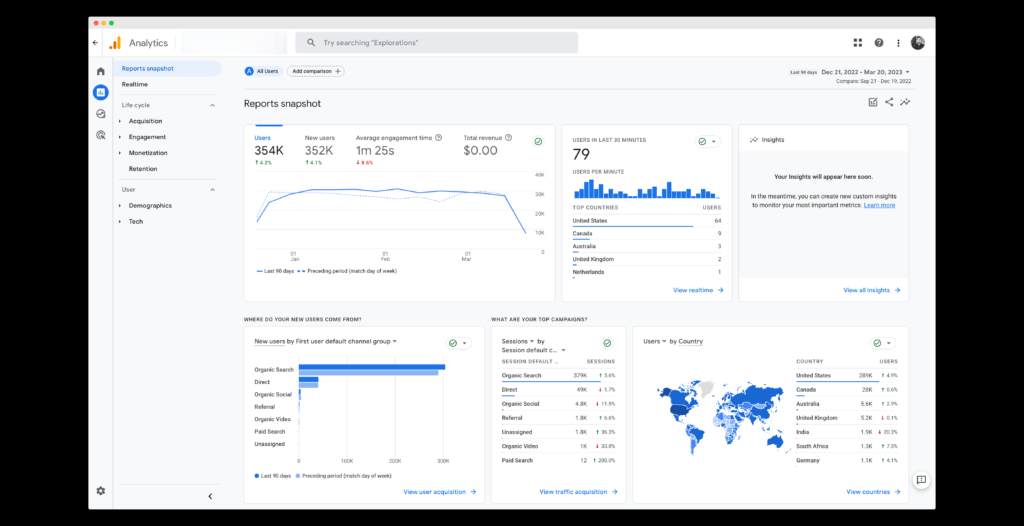
“Google Analytics 4 for Businesses …” from www.creativeo.co
Mastering Sales Strategy Success with Google Analytics
When it comes to boosting your sales strategy, Google Analytics is an indispensable tool. It allows you to track and analyze data, providing insights that can significantly enhance your decision-making process. But before diving into the specifics, let’s talk about the foundation: setting business goals and objectives.
Setting Business Goals and Objectives
Every successful sales strategy begins with clear, well-defined goals. These goals not only guide your actions but also provide a benchmark against which you can measure your progress. For instance, if your objective is to increase online sales by 20% in the next quarter, Google Analytics can help you track your progress toward this goal.
It’s crucial to ensure that your goals are SMART—Specific, Measurable, Achievable, Relevant, and Time-bound. This approach will help you focus on what truly matters and avoid getting lost in the sea of data that Google Analytics provides.
Here’s a simple example:
“Increase website traffic by 15% in the next three months by optimizing SEO strategies and improving content quality.”
Such a goal is specific, measurable, and directly tied to your sales strategy.
Key Performance Indicators for Sales Strategy
Once your goals are set, the next step is to identify the Key Performance Indicators (KPIs) that will help you measure success. KPIs are specific metrics that reflect how well you are achieving your business objectives.
In the context of a sales strategy, KPIs might include:
- Conversion rate: The percentage of visitors who complete a desired action, like making a purchase.
- Average order value: The average amount spent by customers per transaction.
- Customer acquisition cost: The cost associated with acquiring a new customer.
- Cart abandonment rate: The percentage of users who add items to their cart but do not complete the purchase.
These KPIs provide valuable insights into the effectiveness of your sales strategy and highlight areas that may need improvement. For instance, understanding your cart abandonment rate can help you optimize the checkout process.
Aligning Google Analytics with Business Goals
Aligning Google Analytics with your business goals involves customizing the platform to track the metrics that matter most to you. This requires setting up specific goals within Google Analytics that correspond to your business objectives.
For example, if one of your goals is to increase newsletter sign-ups, you can set up a goal in Google Analytics to track the number of users who complete the sign-up form. This way, you can monitor your progress and adjust your strategy as needed. To enhance your email marketing efforts, consider exploring the differences between Klaviyo and Mailchimp to avoid common mistakes.
Moreover, Google Analytics offers a variety of features, such as custom reports and dashboards, that allow you to visualize your data in a way that aligns with your business goals. By leveraging these features, you can gain deeper insights into your performance and make more informed decisions. For a comprehensive guide on using these tools effectively, explore how to use GA4 for your marketing strategy.
Building an Effective Measurement Plan
Now that we have established the importance of setting goals and aligning them with Google Analytics, let’s delve into creating a measurement plan. A well-structured measurement plan is crucial for maximizing the effectiveness of Google Analytics and ensuring that your data-driven decisions are based on accurate and relevant information.
Defining Success Metrics
Defining success metrics is a critical step in building an effective measurement plan. These metrics should be directly tied to your business goals and provide a clear indication of your progress.
Begin by identifying the key actions that contribute to your goals. For instance, if your goal is to increase online sales, your success metrics might include the number of transactions, revenue generated, and conversion rate. By focusing on these metrics, you can assess your performance and identify areas for improvement.
Mapping Goals to Google Analytics Features
Mapping your goals to Google Analytics features involves configuring the platform to track the specific actions and events that align with your objectives. This requires setting up goals, events, and custom dimensions within Google Analytics. For a deeper understanding, consider building an effective measurement plan.
For example, if you want to track how many users watch a product video on your site, you can set up an event in Google Analytics to record when the video is played. This data can then be analyzed to understand user engagement and its impact on sales.
By mapping your goals to Google Analytics features, you can ensure that you are collecting the right data to inform your sales strategy and drive success.
Analyzing Traffic Sources
Understanding where your website traffic comes from is essential in shaping your sales strategy. Google Analytics provides insights into various traffic sources, such as organic search, paid search, direct visits, social media, and referral links. By analyzing these sources, you can determine which channels are driving the most traffic and conversions.
For instance, if you notice a significant amount of traffic coming from social media, you might consider increasing your social media marketing efforts. Conversely, if paid search is underperforming, you might need to reevaluate your ad spend or targeting strategy.
To get started, navigate to the “Acquisition” section in Google Analytics and explore the “All Traffic” reports. These reports offer a detailed breakdown of your traffic sources, helping you identify which channels are contributing to your success and which need improvement.
Understanding Conversion Paths
Conversion paths refer to the journey a user takes on your website before completing a desired action, such as making a purchase or signing up for a newsletter. By analyzing these paths, you can gain insights into user behavior and identify potential bottlenecks in your sales funnel.
Google Analytics provides a “Multi-Channel Funnels” report that shows the various touchpoints users interact with before converting. This report highlights the role each channel plays in the conversion process, helping you understand how different marketing efforts contribute to your overall sales strategy.
For example, you might find that users often visit your site multiple times before making a purchase, indicating that your retargeting efforts are effective. By understanding these conversion paths, you can optimize your marketing campaigns to better guide users toward conversion.
E-commerce Data and Sales Funnel Analysis
If you run an online store, e-commerce data is invaluable for assessing the performance of your sales strategy. Google Analytics offers an “E-commerce” section that provides insights into key metrics such as revenue, transactions, and average order value.
By analyzing this data, you can identify trends and patterns in customer behavior. For example, if you notice a high cart abandonment rate, you might investigate potential issues with your checkout process. Alternatively, if certain products are consistently top sellers, you could consider promoting them more prominently on your site.
Sales funnel analysis is another crucial aspect of e-commerce data. By visualizing the steps users take from landing on your site to completing a purchase, you can identify where potential customers drop off and make necessary adjustments to improve conversion rates.
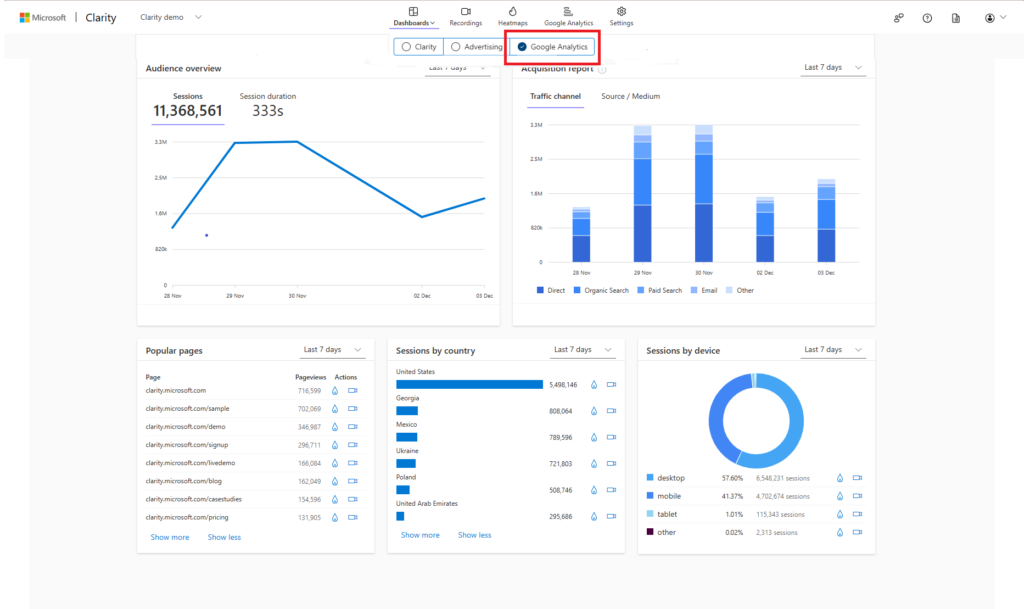
“Google Analytics Dashboard | Microsoft …” from learn.microsoft.com
Challenges and Solutions in Google Analytics Implementation
Implementing Google Analytics effectively can be challenging, but addressing common issues will ensure you get the most out of the platform. Let’s explore some of these challenges and how to overcome them.
Maintaining Data Quality
Data quality is paramount in making informed decisions. To maintain high data quality, ensure that your Google Analytics account is set up correctly. This includes configuring tracking codes, setting up goals and events, and regularly auditing your data for accuracy.
One common issue is duplicate tracking, which can occur if tracking codes are implemented incorrectly on your site. Regularly review your setup to ensure that data is being collected accurately and consistently.
Handling Compliance and Privacy Issues
With increasing concerns about data privacy, it’s essential to ensure that your Google Analytics implementation complies with relevant regulations, such as GDPR and CCPA. This includes obtaining user consent for data collection and providing options for users to opt-out of tracking.
Google Analytics offers features like IP anonymization and data retention settings to help you comply with privacy regulations. Regularly review your privacy policy and ensure that your data collection practices align with legal requirements. For more insights on optimizing your online strategies, explore this beginner’s guide to e-commerce.
Overcoming Data Silos
Data silos occur when information is isolated within different departments or systems, making it difficult to get a comprehensive view of your sales strategy. To overcome this, integrate Google Analytics with other tools and platforms, such as CRM systems, email marketing platforms, and advertising networks.
By consolidating data from various sources, you can gain a holistic view of your marketing efforts and make more informed decisions. Encourage collaboration between teams to ensure that insights are shared and utilized effectively across your organization.
For example, by integrating Google Analytics with your CRM system, you can track the entire customer journey, from initial contact to final sale, and gain valuable insights into the effectiveness of your sales strategy.
|
Challenge |
Solution |
|---|---|
|
Maintaining Data Quality |
Regularly audit data, ensure correct tracking code implementation |
|
Handling Compliance |
Use IP anonymization, update privacy policies |
|
Overcoming Data Silos |
Integrate tools, encourage cross-team collaboration |
By addressing these challenges, you can maximize the effectiveness of Google Analytics and ensure that your sales strategy is informed by accurate and comprehensive data.

“Benefits of Collaboration Workspaces …” from www.insight.com
Collaboration and Team Involvement
Successful implementation of Google Analytics requires collaboration across departments. Involving your team in the process ensures that everyone understands the importance of data-driven decision-making and contributes to the overall success of your sales strategy.
Encourage regular meetings to discuss insights gained from Google Analytics and how they can be applied to improve performance. By fostering a culture of collaboration, you can ensure that your entire organization is aligned with your business goals and working towards a common vision.
Integrating Cross-Departmental Insights
Integrating insights from different departments can provide a more comprehensive understanding of your sales strategy. For example, marketing teams can share data on customer behavior with sales teams, helping them tailor their approach to better meet customer needs.
By leveraging cross-departmental insights, you can identify opportunities for improvement and ensure that your sales strategy is aligned with your overall business objectives. Encourage open communication and collaboration between teams to maximize the impact of your data-driven decisions.
Encouraging Data-Driven Decision Making
To truly harness the power of Google Analytics, it’s essential to foster a culture of data-driven decision-making within your organization. Encourage team members to use data to inform their decisions and provide training and resources to help them understand how to interpret and apply insights from Google Analytics.
By empowering your team with the tools and knowledge they need to make informed decisions, you can drive your sales strategy forward and achieve greater success.
Optimizing Your Sales Strategy Based on Insights
Once you have gathered insights from Google Analytics, it’s time to put them into action. Optimizing your sales strategy based on these insights involves identifying areas for improvement, adjusting your marketing efforts, and implementing strategies to enhance performance.
Start by reviewing your KPIs and identifying areas where you are underperforming. Use the insights gained from Google Analytics to pinpoint the root causes of these issues and develop strategies to address them. For example, if your conversion rate is low, consider testing different landing page designs or improving your call-to-action.
Regularly review and adjust your strategy based on the data you collect to ensure that you are continually improving and achieving your business goals.
Identifying Areas for Improvement
When optimizing your sales strategy, identifying areas for improvement is crucial. Google Analytics provides a wealth of data that can help pinpoint where you may be falling short. Start by reviewing your KPIs and assessing whether you are meeting your business objectives.
For example, if your conversion rate is lower than expected, examine the user journey on your site. Are there any bottlenecks or friction points that might be causing users to abandon their carts? Look at metrics such as bounce rate, average session duration, and page load times to identify potential issues.
Consider using Google Analytics’ behavior flow report to visualize the path users take through your site. This can help you identify common drop-off points and areas where users might be getting stuck. By understanding these pain points, you can make targeted improvements to enhance the user experience and boost conversions. For further insights, explore Optimizely’s role in online sales trends.
Adjusting Marketing Strategies
Once you’ve identified areas for improvement, it’s time to adjust your marketing strategies accordingly. Use the insights gained from Google Analytics to refine your approach and ensure that your efforts are aligned with your business goals.
For instance, if you find that a particular traffic source is driving high-quality leads, consider increasing your investment in that channel. Conversely, if a channel is underperforming, you may need to reevaluate your targeting or messaging strategy. Regularly monitor your performance and be prepared to make adjustments as needed to stay on track.
Implementing A/B Testing for Optimization
A/B testing is a powerful tool for optimizing your sales strategy. By testing different variations of your website, emails, or ads, you can determine which elements are most effective at driving conversions. Use Google Analytics to track the results of your A/B tests and make data-driven decisions about which changes to implement.
Future Trends in Google Analytics and Sales Strategy
As technology continues to evolve, so too does the landscape of digital marketing. Staying ahead of future trends in Google Analytics and sales strategy is essential for maintaining a competitive edge.
One significant trend is the increasing use of machine learning and artificial intelligence in data analysis. These technologies can help marketers identify patterns and insights that might otherwise go unnoticed, allowing for more precise targeting and personalization.
Impact of Machine Learning on Data Analysis
Machine learning is transforming the way we analyze data in Google Analytics. By leveraging machine learning algorithms, businesses can uncover hidden insights and make more informed decisions about their sales strategy.
For example, machine learning can help identify high-value customer segments, predict future buying behavior, and optimize marketing campaigns for maximum impact. By integrating these technologies into your analytics strategy, you can gain a deeper understanding of your customers and tailor your approach to meet their needs.
Emerging Technologies in E-commerce Tracking
Emerging technologies, such as augmented reality and virtual reality, are changing the way consumers interact with e-commerce platforms. These technologies offer new opportunities for tracking user behavior and understanding how customers engage with products online.
As these technologies become more prevalent, it’s important to stay informed about how they can be integrated into your Google Analytics strategy. By leveraging these tools, you can gain a more comprehensive view of the customer journey and optimize your sales strategy accordingly.
Adapting to Changes in Customer Behavior
Customer behavior is constantly evolving, and businesses must adapt to stay relevant. Google Analytics provides valuable insights into changing trends and preferences, allowing you to adjust your sales strategy to meet the needs of your audience.
For example, if you notice an increase in mobile traffic, consider optimizing your website for mobile devices to enhance the user experience. Similarly, if social media engagement is on the rise, you might focus on creating more shareable content to capitalize on this trend.
By staying attuned to changes in customer behavior, you can ensure that your sales strategy remains effective and aligned with your business goals.
Frequently Asked Questions (FAQ)
As you work to optimize your sales strategy with Google Analytics, you may have questions about the best practices and techniques for success. Here are some common questions and answers to help guide you.
What are the essential metrics to track in Google Analytics for sales strategy?
When tracking your sales strategy in Google Analytics, focus on metrics such as conversion rate, average order value, customer acquisition cost, and cart abandonment rate. These metrics provide insights into the effectiveness of your sales efforts and highlight areas for improvement.
Additionally, consider tracking traffic sources, user behavior, and e-commerce data to gain a comprehensive view of your performance and make informed decisions about your strategy.
How can Google Analytics help improve conversion rates?
Google Analytics offers a wealth of data that can help you identify opportunities to improve your conversion rates. By analyzing user behavior, traffic sources, and conversion paths, you can pinpoint areas where users are dropping off and make targeted improvements to enhance the user experience.
Implementing A/B testing and monitoring the results through Google Analytics can also help you determine which changes are most effective at driving conversions. By continuously optimizing your strategy based on data-driven insights, you can achieve greater success and meet your business goals.


Leave a Reply