
Key Takeaways
- MainWP offers a centralized dashboard to manage multiple WordPress sites efficiently, saving time and reducing complexity.
- Setting up MainWP for multisite management involves installing the MainWP Dashboard plugin and connecting child sites for seamless updates.
- Regularly scheduled backups and security checks are crucial to maintaining the health and security of your websites.
- Streamlining updates across websites ensures that all plugins and themes are up-to-date, reducing vulnerabilities.
- Optimizing database and site speed can significantly enhance user experience and search engine rankings.

“Juggling Too Many Balls Keeps You …” from medium.com
Managing multiple websites can often feel like juggling too many balls at once. However, MainWP simplifies this process by providing a centralized platform where you can oversee all your WordPress sites. This tool is particularly beneficial for those handling numerous sites, as it minimizes the complexity and time involved in maintaining each one individually.
MainWP Multisite Management Techniques & Tips
When it comes to managing a multisite network, MainWP stands out as an effective tool. By offering a unified interface, it allows administrators to streamline updates, monitor performance, and enforce security measures across all sites simultaneously. Let’s delve into why MainWP is a powerhouse for website management.
Why MainWP is an Effective Tool
MainWP is an effective tool for managing multiple WordPress sites from a single dashboard. It offers a range of features that streamline the process of updating, monitoring, and securing your websites. For instance, when it comes to multisite configuration, MainWP provides seamless integration with popular security plugins like Wordfence, ensuring all your sites are protected.
MainWP’s effectiveness lies in its ability to bring together various management tasks under one roof. Instead of logging into each site individually, you can manage everything from a single dashboard. This not only saves time but also reduces the risk of overlooking important updates or security issues.
Moreover, MainWP is highly customizable. You can tailor it to suit your specific needs by using various extensions available for different functionalities. Whether you need to enhance security, improve SEO, or streamline content management, MainWP has you covered.
Another significant advantage is its compatibility with a wide range of plugins and themes. This ensures that you can use your preferred tools without compatibility issues, making MainWP a versatile solution for multisite management.
Setting Up MainWP for Multisite Management
Setting up MainWP for managing a multisite network is straightforward. First, you need to install the MainWP Dashboard plugin on a dedicated WordPress site. This site will serve as your control center for managing all your child sites.
Once the MainWP Dashboard is set up, the next step is to connect your child sites. This is done by installing the MainWP Child plugin on each site you wish to manage. After installation, you can easily connect these sites to your dashboard using the unique connection credentials provided.
It’s important to ensure that your MainWP Dashboard site is secure, as it will be the hub for managing all your sites. Regular security audits and updates are essential to maintaining its integrity.
Steps to Enhance Website Performance with MainWP
To effectively enhance your website’s performance with MainWP, it’s crucial to consider scaling site performance and speed using tools like W3 Total Cache. This can significantly improve load times and user experience.
Enhancing the performance of your websites is crucial for providing a smooth user experience and achieving better search engine rankings. MainWP offers several features to help you optimize your sites effectively. For more detailed guidance, you can explore MainWP and WordPress Multisite compatibility test in their knowledge base.
Streamline Updates Across Websites
Efficiently managing updates across multiple websites can be a daunting task. Utilizing tools like Wordfence can help streamline the process. For those looking to enhance their security measures, consider following a Wordfence Multisite Configuration Guide to ensure all sites are protected and up-to-date.
One of the most time-consuming tasks in website management is keeping plugins and themes up-to-date. With MainWP, you can automate this process, ensuring that all your sites are running the latest versions of their components. This not only saves time but also helps prevent security vulnerabilities that can arise from outdated software.
To streamline updates, navigate to the ‘Updates’ section in your MainWP Dashboard. Here, you can set up automatic updates for plugins, themes, and WordPress core files. You can also choose to receive notifications for available updates, giving you control over when and how updates are applied.
Scheduled Backups and Security Measures
Regular backups are a critical component of any website management strategy. With MainWP, you can schedule automated backups for all your sites, ensuring that you have a recent copy of your data in case of emergencies. This can be set up in the ‘Backups’ section of your dashboard.
Besides that, implementing security measures is equally important. MainWP offers various security extensions that can help you monitor your sites for potential threats and vulnerabilities. You can set up regular security scans and receive alerts for any suspicious activity.
Optimize Database and Site Speed
To enhance your website’s performance, it’s crucial to scale site performance and speed using effective caching solutions. By implementing these strategies, you can ensure a faster and more efficient user experience.
Website speed plays a significant role in user satisfaction and SEO rankings. MainWP provides tools to help you optimize your databases and improve site speed. Regular database optimization can reduce load times and enhance performance.
- Use MainWP’s database cleanup features to remove unnecessary data.
- Implement caching solutions to improve page load times.
- Minimize the use of heavy plugins that can slow down your site.
By following these steps, you can significantly enhance the performance of your websites, leading to a better user experience and higher search engine rankings.
Using MainWP Dashboard for Insights
“MainWP WordPress Management” from mainwp.com
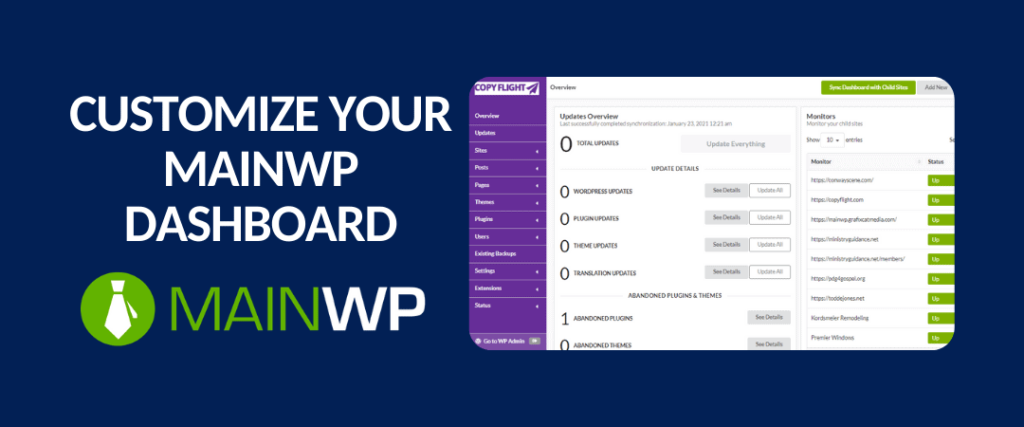
The MainWP Dashboard is a powerhouse for gaining insights into the performance and status of your websites. With a single glance, you can assess the health of all your sites, identify issues, and make informed decisions about maintenance and updates. This centralized view is invaluable for staying on top of your website management tasks.
One of the standout features of the MainWP Dashboard is its ability to generate comprehensive reports. These reports provide detailed information on site performance, security status, and update history. By regularly reviewing these reports, you can identify trends, spot potential issues before they become major problems, and ensure that your sites are running smoothly.
Automating Notifications and Alerts
In the fast-paced world of website management, staying informed is crucial. MainWP allows you to automate notifications and alerts, ensuring that you are always aware of important changes or issues that require your attention. This feature helps you respond quickly to potential problems, minimizing downtime and maintaining a seamless user experience.
To set up automated notifications, navigate to the ‘Notifications’ section in your MainWP Dashboard. Here, you can configure alerts for a variety of events, such as available updates, security vulnerabilities, or performance issues. You can choose to receive these notifications via email or directly within the MainWP interface, providing flexibility in how you stay informed.
Customization and Scalability Strategies
One of the key advantages of MainWP is its ability to scale with your needs. Whether you’re managing a handful of sites or a large network, MainWP offers customization options that allow you to tailor the platform to your specific requirements. Let’s explore how you can expand and customize MainWP to suit your needs.
Expanding with MainWP Extensions
MainWP offers a wide range of extensions that enhance its functionality and allow you to add new features to your management toolkit. These extensions cover various aspects of website management, from security and backups to SEO and content management. By choosing the right extensions, you can expand MainWP’s capabilities to meet your specific needs.
For example, if you’re focused on enhancing security, you might consider the ‘MainWP Sucuri’ extension, which provides advanced security scanning and monitoring features. Alternatively, if you’re looking to improve your site’s SEO, the ‘MainWP SEO’ extension offers tools for optimizing your content and tracking your site’s performance in search engines.
Tailoring Features for Specific Needs
Customizing MainWP to fit your specific needs involves more than just choosing the right extensions. It’s also about configuring the platform to align with your workflow and management style. MainWP offers a variety of settings and options that allow you to tailor its features to your preferences.
For instance, you can customize the MainWP interface to display the information that is most relevant to you. This might include rearranging dashboard widgets, setting up custom reports, or configuring automated tasks to align with your management schedule. By tailoring MainWP to your needs, you can streamline your workflow and enhance your efficiency.
- Use the ‘Custom Dashboard’ feature to create a personalized view of your sites.
- Set up automated tasks for routine maintenance activities, such as backups and updates.
- Configure custom reports to focus on the metrics that matter most to you.
Common Challenges and Solutions
While MainWP offers a robust solution for multisite management, it’s not without its challenges. Understanding these challenges and knowing how to address them is key to maximizing the benefits of MainWP. For example, consider exploring this Wordfence multisite configuration guide for enhancing security across your network.
Addressing Plugin Conflicts
One common issue that website administrators face is plugin conflicts. These conflicts can arise when different plugins try to perform similar functions or when a plugin is not compatible with the latest version of WordPress. MainWP can help you manage these conflicts effectively.
To address plugin conflicts, start by identifying the problematic plugins. MainWP’s reporting features can help you pinpoint which plugins are causing issues. Once identified, you can take steps to resolve the conflict, such as updating the plugins, disabling conflicting features, or replacing the problematic plugin with a more compatible alternative. For a comprehensive understanding of plugin features, consider exploring this Jetpack features guide.
- Regularly update all plugins to ensure compatibility with the latest WordPress version.
- Use MainWP’s reporting tools to monitor plugin performance and identify conflicts early.
- Consider using lightweight plugins that are less likely to cause conflicts.
By proactively managing plugin conflicts, you can maintain the stability and performance of your sites, ensuring a smooth experience for your users.
Managing Server Resource Utilization
Another challenge in multisite management is managing server resources effectively. As your network grows, it can place increased demands on your server, leading to performance issues. MainWP provides tools to help you monitor and manage resource utilization.
To manage server resources, start by monitoring your site’s performance metrics. MainWP’s dashboard offers insights into server load, memory usage, and other critical metrics. By keeping an eye on these metrics, you can identify potential bottlenecks and take steps to optimize resource utilization.
Additionally, consider implementing caching solutions and optimizing your site’s code to reduce server load. Regularly review your site’s plugins and themes to ensure they are optimized for performance.
By effectively managing server resources, you can ensure that your sites run smoothly, even as your network grows.
Final Recommendations for MainWP Users

“The Importance of Saving Time (and how …” from medium.com
In conclusion, MainWP provides a comprehensive solution for managing multiple WordPress sites from a single dashboard. By leveraging its powerful features, you can streamline updates, enhance security, and optimize site performance. This not only saves time but also ensures that your sites remain secure and perform well.
As you continue to use MainWP, it’s important to stay informed about new features and updates. The MainWP community and support forums are excellent resources for learning about the latest developments and best practices. By staying engaged with the community, you can maximize the benefits of MainWP and keep your sites running smoothly.
Maintenance Tips for Long-Term Success
For long-term success with MainWP, regular maintenance is key. Here are some tips to help you maintain your sites effectively:
- Schedule Regular Backups: Ensure that you have automated backups in place for all your sites. This provides a safety net in case of data loss or site issues.
- Monitor Site Performance: Use MainWP’s reporting tools to keep an eye on site performance metrics and address any issues promptly.
- Update Plugins and Themes: Regularly update all plugins and themes to ensure compatibility and security.
- Conduct Security Audits: Perform regular security audits to identify and address potential vulnerabilities.
- Engage with the Community: Participate in MainWP forums and discussions to learn from other users and stay informed about new features.
“By following these maintenance tips, you can ensure the long-term success of your sites and enjoy the full benefits of MainWP.”
Frequently Asked Questions
Here are some common questions about MainWP and its capabilities, including how to scale site performance effectively:
What are the benefits of using MainWP for multisite management?
MainWP offers several benefits for multisite management, including:
- Centralized Management: Manage all your sites from a single dashboard, saving time and reducing complexity.
- Automated Updates: Keep plugins, themes, and WordPress core files up-to-date automatically.
- Enhanced Security: Implement security measures and receive alerts for potential threats.
- Customizable Features: Tailor MainWP to suit your specific needs with a wide range of extensions.
- Comprehensive Reporting: Generate detailed reports on site performance, security, and updates.
“MainWP’s centralized management and automation features make it an invaluable tool for website administrators.”
Is MainWP suitable for beginners?
Yes, MainWP is suitable for beginners. Its user-friendly interface and comprehensive documentation make it easy to get started. Additionally, the MainWP community offers support and guidance, helping new users navigate the platform and make the most of its features.
How does MainWP handle plugin and theme updates?
MainWP automates the process of updating plugins and themes. You can configure automatic updates for all your sites, ensuring that they are always running the latest versions. This reduces the risk of security vulnerabilities and compatibility issues.
To manage updates, navigate to the ‘Updates’ section in your MainWP Dashboard. Here, you can set up automatic updates and receive notifications for available updates, giving you control over when and how updates are applied.
“Automated updates with MainWP help keep your sites secure and up-to-date without the need for manual intervention.”
Can MainWP manage website security effectively?
- Security Scans: Regularly scan your sites for vulnerabilities and receive alerts for potential threats.
- Automated Backups: Schedule automated backups to ensure data safety and recovery options.
- Security Extensions: Use MainWP’s security extensions to enhance protection against common threats.
MainWP offers a range of security features and extensions that help you monitor and protect your sites. By implementing these security measures, you can minimize the risk of attacks and ensure the safety of your data. For those seeking Jetpack alternatives, MainWP provides robust solutions to enhance site security and performance.
Regular security audits and updates are essential to maintaining the integrity of your MainWP Dashboard and all connected sites. By staying vigilant and proactive, you can effectively manage website security with MainWP.
Are there any limitations to using MainWP with multisite networks?
While MainWP is a powerful tool for managing multiple sites, there are some limitations to be aware of when using it with multisite networks. For example, MainWP is not designed to manage WordPress Multisite installations directly. Instead, it is best suited for managing individual WordPress sites as child sites connected to a central dashboard.
Additionally, certain plugins and themes may have compatibility issues with MainWP, particularly if they are not regularly updated. It’s important to monitor plugin performance and address any conflicts that arise, such as those involving Wordfence multisite configurations.


Leave a Reply