
Key Takeaways
- Translating WPForms can significantly increase your website’s reach by making it accessible to non-English speaking users.
- Tools like TranslatePress and Loco Translate are user-friendly and effective for translating WPForms into multiple languages.
- Customizing form labels, notifications, and validation messages enhances user experience and engagement.
- Multilingual forms can boost conversion rates by catering to a diverse audience.
- Regular updates and community feedback are essential for maintaining accurate translations.
Benefits of Translating WPForms

“What is the Role of a Language Translator?” from www.lingualinx.com
Imagine opening your website to a global audience. Translating WPForms is not just about converting words; it’s about making your site accessible and engaging for people from different linguistic backgrounds. This is crucial if you want to reach a wider audience.
Reaching a Wider Audience
When you translate your WPForms, you break down language barriers that might prevent potential users from engaging with your content. This means that someone in France, Brazil, or Japan can interact with your site as easily as someone in the United States. Therefore, you’re not just increasing traffic; you’re expanding your community.
Enhancing User Experience
People feel more comfortable and are more likely to engage with content in their native language. By offering your forms in multiple languages, you enhance user experience, making it easier for users to fill out forms without language-related confusion. This not only increases satisfaction but also encourages users to return.
Increasing Conversion Rates
When users understand what they’re filling out, they’re more likely to complete forms. This directly impacts conversion rates. For instance, if you run an e-commerce site, multilingual forms can lead to more completed purchases. It’s a simple yet effective way to boost your bottom line.
Boosting Revenue Potential
Expanding your audience and increasing conversions naturally leads to higher revenue potential. By catering to a global audience, you’re not just opening your site to more visitors; you’re creating opportunities for increased sales and engagement. This is the ultimate goal for many businesses.
Getting Started with WPForms Translation
Before diving into translation, there are a few things you need to have in place. These initial steps will ensure that your translation process is smooth and efficient.
Ensure WPForms Installation and Activation
First, make sure that WPForms is installed and activated on your WordPress site. This is the foundation of your forms, and without it, you won’t be able to proceed with translations. If you haven’t installed WPForms yet, you can do so from the WordPress plugin directory.
Choosing Translation Tools and Resources
There are several tools available for translating WPForms, but not all are created equal. Some popular options include TranslatePress and Loco Translate. Both are user-friendly and offer comprehensive translation features. Choose a tool that fits your needs and is compatible with your WordPress setup. For those interested in enhancing site performance, consider exploring our guide on W3 Total Cache for optimal speed and efficiency.
TranslatePress, for instance, allows you to translate directly from the front-end, providing a visual interface that makes the process intuitive. On the other hand, Loco Translate is known for its robust translation management features.
Setting Up and Configuring WPForms for Translation
Once you’ve chosen your translation tool, the next step is to configure WPForms for translation. This involves setting up your forms to be ready for multilingual input. It’s a straightforward process, but it’s essential to follow each step carefully to ensure accuracy.
Begin by accessing your WPForms settings and selecting the languages you want to support. This setup is crucial because it dictates how your forms will appear in different languages. Most importantly, ensure that your chosen translation tool is integrated with WPForms to streamline the process. For those interested in enhancing their site’s performance while managing translations, consider exploring our W3 Total Cache guide to improve speed and efficiency.
Using Built-In Customization Options
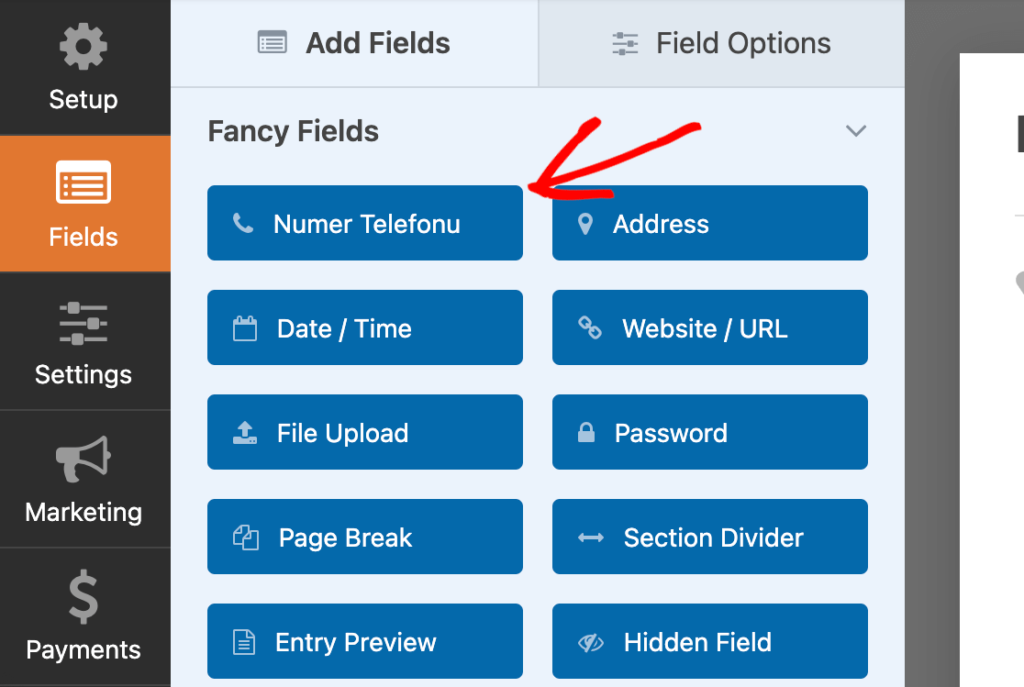
“Translate WPForms into a Different Language” from wpforms.com
WPForms offers built-in customization options that allow you to tailor your forms to different languages. This includes adjusting form labels, messages, and notifications to suit the language preferences of your users. By leveraging these options, you can ensure that every aspect of your form is clear and accessible.
Customizing Form Labels and Messages
“Customizing your form labels and messages in WPForms is crucial for clarity and user engagement. For those looking to enhance multilingual support, you can learn more about translating WPForms into different languages. This ensures that users know exactly what information they need to provide, reducing form abandonment rates.”
Customizing form labels and messages is a key step in translating WPForms. These are the text elements that guide users through the form, so they need to be clear and in the user’s language. To start, navigate to your form editor in WPForms. Here, you can click on each form field and edit the label and placeholder text to match the desired language. For more advanced form customization, you might consider exploring this Gravity Forms setup guide as a complementary resource.
Consider cultural nuances when translating labels. For instance, the way a date is formatted or how you ask for a phone number might differ from one country to another. Therefore, it’s not just about translating words but also about adapting to cultural contexts.
Once you’ve customized your labels, preview the form to ensure everything looks right. This step is crucial because it allows you to catch any errors before the form goes live. Remember, a small mistake in translation can lead to confusion and potentially lost conversions.
Translating Form Notifications
Form notifications are the messages sent to users after they submit a form. These can include confirmation emails or thank-you messages. Translating these notifications is just as important as translating the form itself because it completes the user experience. For a comprehensive approach to enhancing your website’s performance, consider exploring the W3 Total Cache guide.
To translate notifications, go to the “Settings” tab in your form editor and select “Notifications.” Here, you can customize the email subject and message body. Ensure that the tone and content are appropriate for the target language. This not only makes the user feel acknowledged but also reinforces your brand’s professionalism.
Adjusting Validation Messages
Validation messages appear when users enter incorrect or incomplete information in a form field. These messages need to be clear and in the user’s language to guide them effectively. In WPForms, you can adjust these messages under the “Settings” tab by selecting “Validation.” For more details on how to customize these messages, check out how to translate WPForms.
Use simple language in validation messages. For example, instead of saying “This field is required,” you might say “Please fill out this field.” Simplicity ensures that users understand what is needed to complete the form successfully. For more tips on making your forms user-friendly, check out how to translate your WordPress contact forms.
Using Translation Plugins Effectively
Translation plugins are powerful tools that simplify the process of translating WPForms. They automate many tasks, saving you time and effort. However, to get the most out of these plugins, you need to understand their features and limitations.
Overview of Popular Plugins like TranslatePress and Loco Translate
TranslatePress and Loco Translate are two of the most popular plugins for translating WordPress forms. TranslatePress offers a front-end visual editor, allowing you to translate content directly on the page. This feature is incredibly user-friendly, especially for those who prefer a visual approach.
Loco Translate, on the other hand, is a robust translation management tool. It provides an interface for translating WordPress themes and plugins, including WPForms. This plugin is ideal for developers who need more control over the translation process.
Step-by-Step Guide to Using TranslatePress
“to Translate Your WordPress Site …” from www.wpkube.com
To use TranslatePress, start by installing and activating the plugin from the WordPress plugin directory. Once activated, navigate to the “Translate Site” option in your WordPress dashboard. Here, you can select the language you wish to translate your site into.
Next, click on any text element on your site to open the translation editor. Translate the text into your desired language and save your changes. This process is straightforward, making it accessible even to those with limited technical skills.
Benefits and Limitations of Using Loco Translate
“Loco Translate – WordPress plugin …” from wordpress.org
Loco Translate is beneficial for those who require detailed translation management. It allows you to edit language files directly within WordPress, offering greater flexibility. However, this plugin may have a steeper learning curve for beginners.
One limitation is that Loco Translate requires some familiarity with language files and WordPress coding standards. Therefore, it might not be the best choice for those looking for a quick and easy solution. Nonetheless, its comprehensive features make it a valuable tool for developers seeking precision. For those interested in enhancing site performance, you might also want to explore our guide on scaling site performance with W3 Total Cache.
Advanced Options for Multilingual Forms
Creating multilingual forms involves more than just translating text. It requires a strategic approach to ensure that all elements of the form are accessible and functional in multiple languages. This section explores some advanced options for achieving this.
Most importantly, consider the user journey. Multilingual forms should provide a seamless experience from start to finish. This means that users should be able to switch languages easily and that all form elements should update accordingly.
“A multilingual form is not just a translated form. It’s an experience tailored to diverse audiences, respecting their language and cultural nuances.”
One advanced option is to use conditional logic to display different form fields based on the selected language. This feature allows you to customize the form experience for each user, ensuring that they only see relevant information. For more advanced customization options, you might want to explore Advanced Custom Fields features.
Creating Bilingual and Multilingual Forms
Creating bilingual or multilingual forms involves setting up language-specific fields and messages. Start by defining the languages you want to support. Then, duplicate your form fields and translate them into the target languages.
Use a language switcher to allow users to select their preferred language. This switcher should be prominently placed on your site to ensure easy access. When a user selects a language, the form should automatically update to reflect their choice.
Additionally, consider using geo-targeting to automatically display forms in the user’s language based on their location. This feature enhances user experience by providing a personalized touch. However, always provide the option to manually change the language, as automatic detection may not always be accurate. For more information on translating forms, you can refer to how to translate WPForms into a different language.
“Geo-targeting can enhance user experience by automatically displaying content in the user’s native language, but always provide a manual override option.”
Handling Complex Language Rules
Some languages have complex grammatical rules that require special attention during translation. For instance, languages like Arabic or Hebrew are read from right to left, which may affect the layout of your form.
In such cases, consult with a native speaker or a professional translator to ensure accuracy. They can provide insights into cultural nuances and linguistic intricacies that may not be immediately apparent.
Using Language Switchers and Selectors
Language switchers and selectors are essential tools for multilingual sites. They allow users to easily switch between languages, ensuring a smooth experience. In WPForms, you can integrate language switchers using plugins like TranslatePress, which offers built-in support for this feature.
When implementing a language switcher, ensure that it is visible and intuitive. Users should be able to switch languages with a single click, and the switcher should be accessible from every page on your site. This accessibility ensures that users can navigate your site in their preferred language at all times.
Maintaining and Updating Translations
Keeping your WPForms translations up-to-date is crucial for maintaining a seamless user experience. As your website evolves, so will the content and forms, necessitating regular updates to your translations. This ensures that all users, regardless of their language, receive accurate and relevant information.
Additionally, maintaining translations involves checking for consistency across different languages. Consistent messaging helps in building trust and reliability with your audience, which is essential for long-term engagement and conversion.
Regular Review and Quality Assurance
Regularly reviewing your translations is an essential part of quality assurance. Set a schedule to periodically check your forms for accuracy and relevance. This can be done monthly or quarterly, depending on how frequently your content changes.
Engage native speakers or professional translators to review the translations. They can provide valuable feedback on linguistic accuracy and cultural appropriateness. This not only ensures quality but also enhances user satisfaction and trust.
Updating Translations for New Form Versions
Whenever you update or create new versions of your forms, it’s crucial to update the translations accordingly. This is particularly important if you’ve added new fields or changed existing ones, as these changes need to be reflected in all supported languages.
To streamline this process, maintain a record of all changes made to your forms. This record will serve as a reference point for translators, ensuring that no detail is overlooked during the update process. For more detailed guidance, you can refer to the WPForms translation guide.
Community and User Feedback
Community and user feedback are invaluable for maintaining accurate and effective translations. Encourage users to provide feedback on any translation issues they encounter. This can be done through feedback forms or surveys.
Implementing user suggestions not only improves the quality of your translations but also strengthens your relationship with your audience. It shows that you value their input and are committed to providing a superior user experience. For more insights on enhancing user experience, check out our troubleshooting guide for mobile responsiveness.
Conclusion: Achieving Effortless Multilingual Support
Achieving effortless multilingual support with WPForms is within reach with the right tools and strategies. By translating your forms, you open the door to a global audience, enhancing user experience and boosting conversion rates. Regular maintenance and updates ensure that your translations remain accurate and relevant, fostering trust and engagement.
Remember, the goal is not just to translate words but to create an inclusive and engaging experience for all users. With tools like TranslatePress and Loco Translate, and a commitment to quality, you can achieve seamless multilingual support that benefits both your business and your audience.
Frequently Asked Questions (FAQ)
Here are some common questions about translating WPForms to help you get started. For more tips on optimizing your forms, check out this WP Rocket optimization guide.
What are the easiest tools for translating WPForms?
TranslatePress and Loco Translate are among the easiest tools for translating WPForms. They offer user-friendly interfaces and comprehensive features that simplify the translation process.
Can I translate WPForms into multiple languages simultaneously?
Yes, you can translate WPForms into multiple languages simultaneously. Both TranslatePress and Loco Translate support multilingual translations, allowing you to manage several languages at once.
Do I need technical skills to translate WPForms?
No, you don’t need extensive technical skills to translate WPForms. The translation tools mentioned are designed to be user-friendly, making them accessible to beginners and non-developers.
How do translation plugins affect site performance?
Translation plugins may have a minimal impact on site performance. However, using lightweight and well-optimized plugins like TranslatePress can help minimize any potential slowdown.
Are there any free plugins available for WPForms translation?
Yes, there are free plugins available for WPForms translation, such as the free version of TranslatePress. These plugins offer basic translation features suitable for small to medium-sized websites. For those looking to enhance their site’s performance, consider exploring site performance optimization techniques alongside translation tools.
- TranslatePress and Loco Translate are recommended tools for WPForms translation.
- Regular updates and user feedback are essential for maintaining translation quality.
- Multilingual support enhances user experience and increases conversion rates.
- Minimal technical skills are required to use translation plugins effectively.
- Free plugins are available for basic WPForms translation needs.
By following these guidelines and leveraging the right tools, you can create a multilingual site that appeals to a diverse audience and drives business success. Embrace the power of language to connect with users worldwide and elevate your online presence.


Leave a Reply